Time Is a Parasite; So Is My Bookmarklet. Would you like to use it too?
I had a pocket of time today in a fluorescent-lit waiting room while my wife was in a procedure (she’s fine—do not let your imagination run off a cliff). The chairs were vinyl. The air smelled faintly of antiseptic and capitalism. I had a coffee on an empty stomach.
So naturally, I built an app.
As a treat.
I’ve been mourning my reading brain lately. Not literacy—focus. The kind of focus that lets you fall headlong into a book and surface 40 pages later dehydrated and spiritually altered. Instead, I’ve been ricocheting off paragraphs like a raccoon in a trash can full of push notifications. Three pages in and my mind wanders off to check the weather in cities I do not live in.
The irony that I routinely publish blog posts longer than my current attention span is not lost on me.
BUT. I digress.
I subvocalize when I read. If you don’t know what that is, it’s the little narrator in your skull who insists on pronouncing every word like you’re reading to a kindergarten class of invisible ghosts. It feels natural. It is also slow. Painfully slow.
Years ago—on a very old, very bad Kindle Fire that now resides in the technological afterlife—I used scrolling, word-by-word reading tools. When I was in peak form, I could cruise at 750–900 words per minute. The text would pulse at the center of the screen. The eye didn’t wander. The mind didn’t drift. It was less “reading” and more “absorbing controlled textual velocity.”
Especially with Bionic-style emphasis—bolded word fragments acting like typographic grappling hooks for your visual cortex.
It worked.
And now? I can’t find anything on the iPad that does it right.
So I built my own.
Because. Of course I did.
How It Do
This thing is pure, feral JavaScript. No backend. No server. No analytics whispering to a marketing dashboard. Just a bookmarklet you into which you can grind any article like a speed-reading Cuisinart.
Here’s the ritual:
- Open Safari to any page.
- Tap Share.
- Tap “Add Bookmark.”
- Save it somewhere civilized, like Favorites. ** (Favorites can live in the toolbar. Make it easy. Remove friction.)
- Name it something heroic. “Speedster” will do.
- Open the Safari sidebar.
- Long press the bookmark you just made.
- Tap Edit.
- Replace the URL with the JavaScript blob below.
Yes. You are replacing a URL with executable text. Yes. This is slightly arcane. Yes. That’s part of the charm.
To run it:
- Navigate to an article.
- Open Bookmarks.
- Tap Speedster.
A small control window blooms into existence like this1:
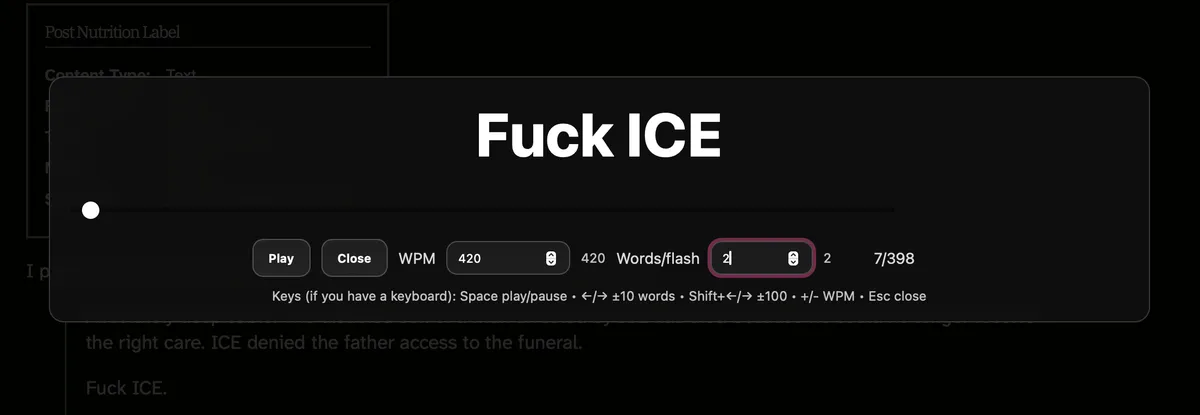
You set:
- Words per minute
- Number of visible words
- Start / Pause
- Close
There are keyboard shortcuts too, if you’re on a desktop and feeling particularly cyborg.
You are now in control of textual time.
A Note on the Code
Bookmarklets are fragile little beasts. They want one long, uninterrupted line of JavaScript. No polite line breaks. No explanatory comments. No breathing room.
If the script looks too civilized, run it through a minifier and compress it into a single line. Or strip out the comments yourself.
What remains should look slightly unhinged. That’s correct. That’s how bookmarklets prefer to exist.
Thoughts? The guestbook lives again
/**
 * Speedster Bookmarklet
 * -----------------------------------------
 * - Extracts article text using Mozilla Readability
 * - Falls back to heuristic extraction
 * - Displays words in RSVP-style flashes
 * - Adjustable WPM and chunk size
 * - iPad Safari compatible (outside Reader Mode)
 */

(function () {

  const INSTANCE_ID = "__sr_best__";

  // If already running, close it.
  if (window[INSTANCE_ID]?.close) {
    window[INSTANCE_ID].close();
    return;
  }

  /* =====================================================
     Core State
  ====================================================== */

  const state = {
    wpm: 420,          // Words per minute
    chunk: 1,          // Words shown per flash
    words: [],         // Tokenized article words
    index: 0,          // Current position
    playing: false,
    timer: null,
    el: {}
  };

  const clamp = (n, min, max) => Math.max(min, Math.min(max, n));
  const normalize = (text) => (text || "").replace(/\s+/g, " ").trim();
  const splitWords = (text) => normalize(text).split(" ").filter(Boolean);

  const msPerWord = () => 60000 / state.wpm;
  const flashDelay = () => msPerWord() * state.chunk;

  /* =====================================================
     Playback Controls
  ====================================================== */

  function stop() {
    state.playing = false;
    clearTimeout(state.timer);
    state.timer = null;
    state.el.play.textContent = "Play";
  }

  function render() {
    const start = state.index;
    const end = Math.min(state.words.length, start + state.chunk);

    state.el.word.textContent =
      state.words.slice(start, end).join(" ");

    state.el.seek.value = state.index;
    state.el.position.textContent =
      `${Math.min(state.index + 1, state.words.length)} / ${state.words.length}`;

    state.el.wpmInput.value = state.wpm;
    state.el.chunkInput.value = state.chunk;
  }

  function tick() {
    if (!state.playing) return;

    render();
    state.index += state.chunk;

    if (state.index >= state.words.length) {
      stop();
      return;
    }

    state.timer = setTimeout(tick, flashDelay());
  }

  function togglePlay() {
    state.playing ? stop() : (state.playing = true, state.el.play.textContent = "Pause", tick());
  }

  function seekTo(index) {
    state.index = clamp(index, 0, state.words.length - 1);
    render();
  }

  function setWPM(value) {
    state.wpm = clamp(value, 60, 2000);
    if (state.playing) {
      clearTimeout(state.timer);
      tick();
    } else {
      render();
    }
  }

  function setChunk(value) {
    state.chunk = clamp(value, 1, 6);
    if (state.playing) {
      clearTimeout(state.timer);
      tick();
    } else {
      render();
    }
  }

  /* =====================================================
     Article Extraction
  ====================================================== */

  function pruneDOM(doc) {
    doc.querySelectorAll(
      "script,style,noscript,iframe,svg,canvas,form,button,input,textarea,select,nav,footer,header,aside"
    ).forEach(node => node.remove());
  }

  function extractWithReadability() {
    if (!window.Readability) return null;

    try {
      const cloned = document.cloneNode(true);
      pruneDOM(cloned);

      const article = new Readability(cloned).parse();
      return normalize(article?.textContent);
    } catch {
      return null;
    }
  }

  function fallbackExtraction() {
    const selectors = [
      "article",
      "main",
      "[role='main']",
      ".post",
      ".article",
      ".content",
      ".entry-content"
    ];

    let best = "";

    selectors.forEach(sel => {
      document.querySelectorAll(sel).forEach(el => {
        const text = normalize(el.innerText);
        if (text.length > best.length) best = text;
      });
    });

    if (best.length > 600) return best;
    return normalize(document.body.innerText);
  }

  async function loadReadability() {
    if (window.Readability) return true;

    const urls = [
      "https://cdn.jsdelivr.net/npm/@mozilla/readability@0.5.0/Readability.js",
      "https://unpkg.com/@mozilla/readability@0.5.0/Readability.js"
    ];

    for (const src of urls) {
      try {
        await new Promise((resolve, reject) => {
          const s = document.createElement("script");
          s.src = src;
          s.onload = resolve;
          s.onerror = reject;
          document.head.appendChild(s);
        });
        if (window.Readability) return true;
      } catch { }
    }

    return false;
  }

  /* =====================================================
     UI Overlay
  ====================================================== */

  function buildUI() {
    const overlay = document.createElement("div");
    overlay.style.cssText = `
      position:fixed;
      inset:0;
      background:rgba(0,0,0,.85);
      color:#fff;
      display:flex;
      align-items:center;
      justify-content:center;
      z-index:2147483647;
      font-family:system-ui;
    `;

    const panel = document.createElement("div");
    panel.style.cssText = `
      width:min(900px,92vw);
      padding:24px;
      border-radius:14px;
      background:rgba(20,20,20,.7);
    `;

    const word = document.createElement("div");
    word.style.cssText = `
      font-size:56px;
      text-align:center;
      font-weight:700;
      min-height:1.4em;
    `;

    const playBtn = document.createElement("button");
    playBtn.textContent = "Play";

    const closeBtn = document.createElement("button");
    closeBtn.textContent = "Close";

    const seek = document.createElement("input");
    seek.type = "range";

    const wpmInput = document.createElement("input");
    wpmInput.type = "number";

    const chunkInput = document.createElement("input");
    chunkInput.type = "number";

    const position = document.createElement("span");

    // Wire controls
    playBtn.onclick = togglePlay;
    closeBtn.onclick = api.close;
    seek.oninput = e => (stop(), seekTo(Number(e.target.value)));
    wpmInput.onchange = e => setWPM(Number(e.target.value));
    chunkInput.onchange = e => setChunk(Number(e.target.value));

    panel.append(word, seek, playBtn, closeBtn, wpmInput, chunkInput, position);
    overlay.append(panel);
    document.body.append(overlay);

    state.el = {
      overlay,
      word,
      play: playBtn,
      seek,
      wpmInput,
      chunkInput,
      position
    };
  }

  /* =====================================================
     Initialization
  ====================================================== */

  const api = {
    close() {
      stop();
      state.el.overlay.remove();
      delete window[INSTANCE_ID];
    }
  };

  window[INSTANCE_ID] = api;

  async function init() {
    buildUI();

    let text = null;

    if (await loadReadability()) {
      text = extractWithReadability();
    }

    if (!text || text.length < 400) {
      text = fallbackExtraction();
    }

    state.words = splitWords(text || "");

    if (!state.words.length) {
      state.el.word.textContent = "No readable text found.";
      return;
    }

    state.el.seek.max = state.words.length - 1;
    render();
  }

  init();

})();
There’s something deeply funny about solving distraction with more technology. But this doesn’t feel like doomscroll tech. It feels like constraint tech. A narrowing beam. A forced march of words across the retina.
It removes choice, and in doing so, it removes temptation.
In a waiting room, with nothing to do but think, I built a tool to quiet the narrator in my skull and make the words move faster than doubt.
Sometimes the cure for distraction is velocity.
Fuck ICE? How did that get there↩